

Most teams treat framer development as either pure design or pure code. That binary thinking creates bottlenecks, handoff friction, and sites that look polished but perform poorly. The reality is more nuanced: modern framer development exists at the intersection of visual design, component architecture, and performance engineering. When you understand this convergence, you stop choosing between aesthetics and speed. You build systems that deliver both.
Why Framer Development Demands a Different Mental Model
Traditional web development separates design from implementation. Designers hand off static files. Developers translate them into code. Framer collapses that workflow into a single environment where design decisions become production code instantly.
This isn't about skipping steps. It's about removing translation layers.
The shift requires three foundational changes in how you think about building:
- Components aren't just reusable UI blocks. They're data-connected systems with state management and conditional logic.
- Layouts don't just adapt to screen sizes. They respond to user behavior, scroll depth, and interaction context.
- Performance isn't an afterthought. It's baked into every image format choice, animation trigger, and font loading strategy.
When you embrace these principles, framer development becomes less about learning a tool and more about understanding how modern web experiences actually scale. Framer's use of React provides the foundation, but your architectural decisions determine whether your site hits sub-second load times or frustrates users with bloat.
Component Architecture: Building Systems That Scale
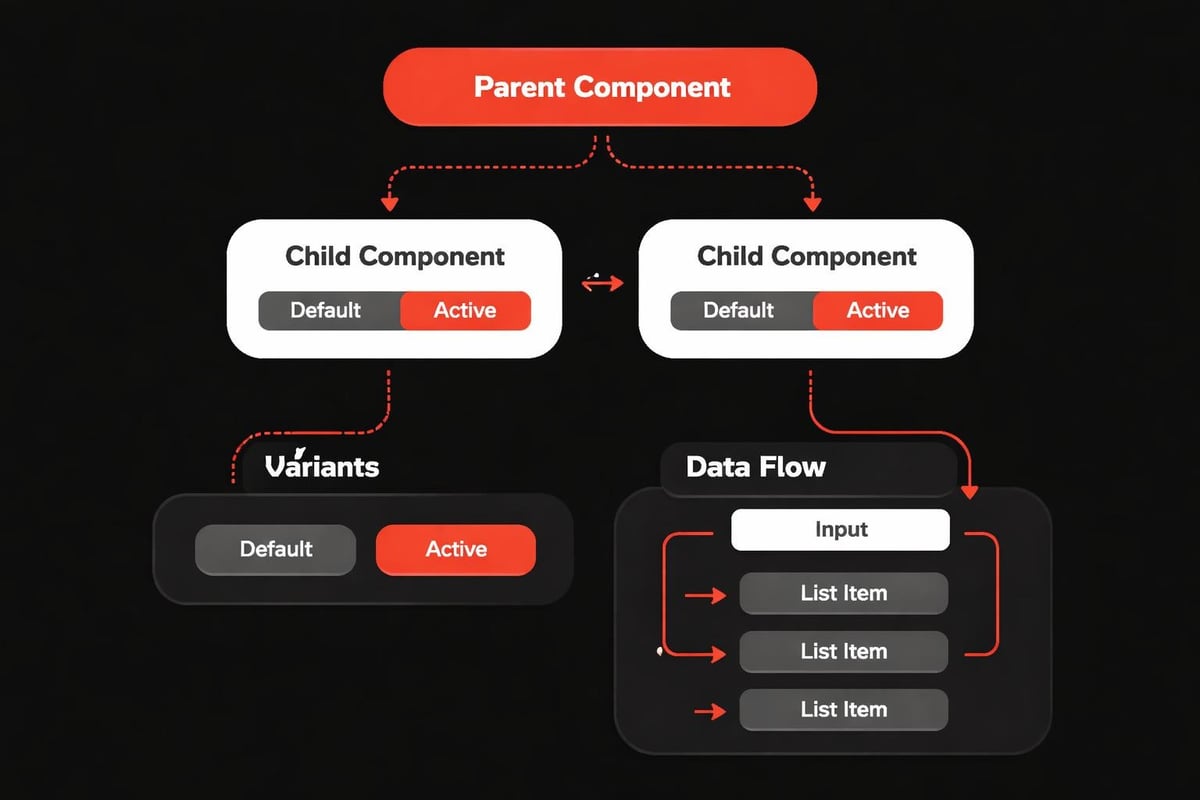
The difference between a fast site and a slow one often comes down to how you structure components. Poor architecture creates duplicate code, bloated file sizes, and maintenance nightmares. Smart architecture creates reusable systems that adapt across contexts without manual rework.
Start With Atomic Composition
Break your interface into the smallest logical units. A button isn't just a rectangle with text. It's a system with:
- Base styles that define typography, spacing, and color tokens
- State variations for hover, active, disabled, and loading conditions
- Contextual adaptations based on parent container or theme mode
- Accessibility attributes that ensure keyboard navigation and screen reader support
This granular approach feels slower initially. You're defining more properties upfront. But when you need to update button styling across 47 instances, you change one source component instead of hunting through pages.
Setting up a component library properly requires discipline. Name components by function, not appearance. "PrimaryCTA" scales better than "BlueButton" because function persists even when brand colors change.
Master Variants and Conditional Logic
Framer's variant system lets you create adaptive components without code duplication. A hero section might have:
- Layout variants for different content types (image-left, image-right, centered)
- Size variants for different importance levels (large, medium, compact)
- Theme variants that respond to dark mode or brand contexts
The power comes from combining these. Instead of building 12 separate hero components, you build one system with variant combinations that cover every use case. When your design system evolves, you update one component rather than rebuilding multiple templates.
This approach mirrors how we structure product experiences for investor-backed startups. Component flexibility reduces technical debt while maintaining design consistency.
| Architecture Pattern | Weak Approach | Strong Approach |
|---|---|---|
| Button System | Separate component per style | One component with variant props |
| Card Layouts | Fixed templates | Modular slots with content injection |
| Navigation | Hardcoded menu items | Dynamic data source with filtering |
| Form Elements | Individual field components | Unified form system with validation |
Performance Optimization: Where Design Meets Engineering
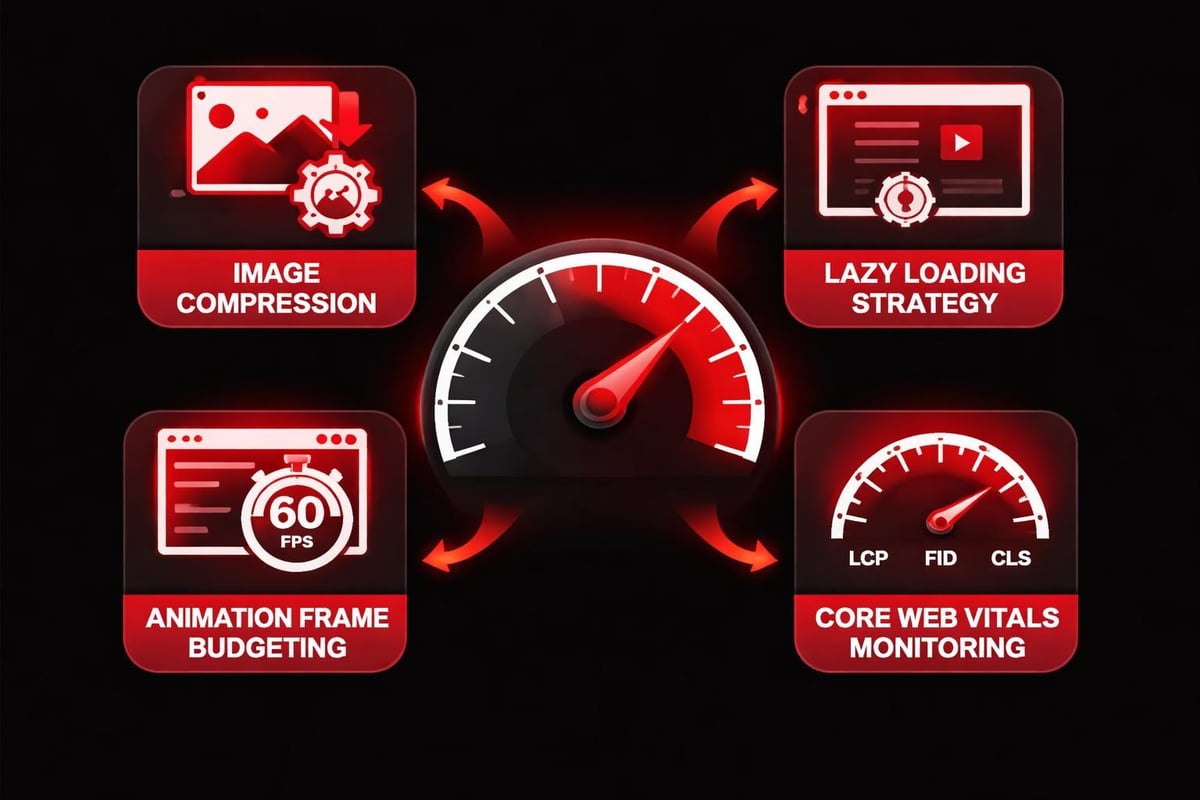
Beautiful design means nothing if your site loads slowly. Framer development requires constant awareness of how visual choices impact performance metrics. Every image, font, animation, and component adds weight. The question isn't whether to optimize but how to make optimization seamless.
Image Strategy That Actually Works
Most performance issues trace back to poorly handled media. A 5MB hero image might look stunning on your 27-inch monitor, but it kills mobile performance and SEO rankings.
Implement this hierarchy:
- Use WebP format with AVIF fallbacks for modern browsers
- Implement responsive image sizing so mobile users don't download desktop assets
- Lazy load anything below the fold, including background images
- Reserve high-res images for critical hero sections only
- Compress aggressively without visible quality loss (70-80% quality is often imperceptible)
Framer's site optimization guidance covers these techniques in depth, but implementation requires constant vigilance. Every new page becomes an opportunity to either maintain standards or introduce bloat.
Animation and Interaction Performance
Smooth animations feel premium. Janky ones destroy credibility. The difference comes down to understanding browser rendering pipelines.
Animations that trigger layout recalculation (width, height, top, left) force the browser to repaint entire sections. This creates visible stuttering, especially on mobile devices. Instead, use transform and opacity properties that leverage GPU acceleration.
A card hover effect that scales up works beautifully with transform: scale(1.05) but performs terribly with width: 110%. The visual result is similar. The performance difference is massive.
This principle extends to scroll-triggered effects. Parallax backgrounds and fade-in animations add depth, but poorly implemented versions check scroll position on every frame, creating computational overhead. Modern framer development uses Intersection Observer API patterns that trigger only when elements enter viewport.
AI-Assisted Workflows: Amplifying Developer Velocity
AI doesn't replace thoughtful framer development. It removes friction from repetitive tasks so you can focus on architectural decisions that actually matter. The developers shipping fastest in 2026 aren't the ones writing every line manually. They're the ones who understand where AI accelerates work without compromising quality.
Content Generation and Localization
Dynamic content insertion transforms static pages into scalable systems. Instead of manually updating product descriptions across 30 pages, you pull from a centralized CMS or database. AI assists by:
- Generating placeholder content during prototyping that matches realistic character counts
- Adapting copy tone across different audience segments
- Creating localized variations that maintain brand voice across languages
- Suggesting content improvements based on conversion data patterns
This isn't about letting AI write final copy. It's about using AI to populate realistic scenarios during development and generate starting points for human refinement.
Component Code Assistance
Complex variant logic gets tedious. You're defining conditional states, managing props, and ensuring accessibility attributes propagate correctly. AI coding assistants excel at:
- Generating boilerplate component structures based on verbal descriptions
- Suggesting variant combinations you might have missed
- Identifying accessibility gaps in custom interactions
- Optimizing component render logic to prevent unnecessary re-renders
The workflow becomes conversational. You describe the behavior you want ("Create a testimonial carousel with auto-rotate, pause on hover, and keyboard navigation"). AI generates the initial structure. You refine the logic, adjust timing, and ensure brand alignment.
This mirrors the AI-assisted workflows we use when building conversion-focused experiences. AI handles structure. Humans handle strategy.
Real-World Application: Building a High-Performance Marketing Site
Theory only matters if it applies to actual projects. Consider a typical startup scenario: you're launching a SaaS product and need a marketing site that converts visitors, loads instantly, and adapts as messaging evolves.
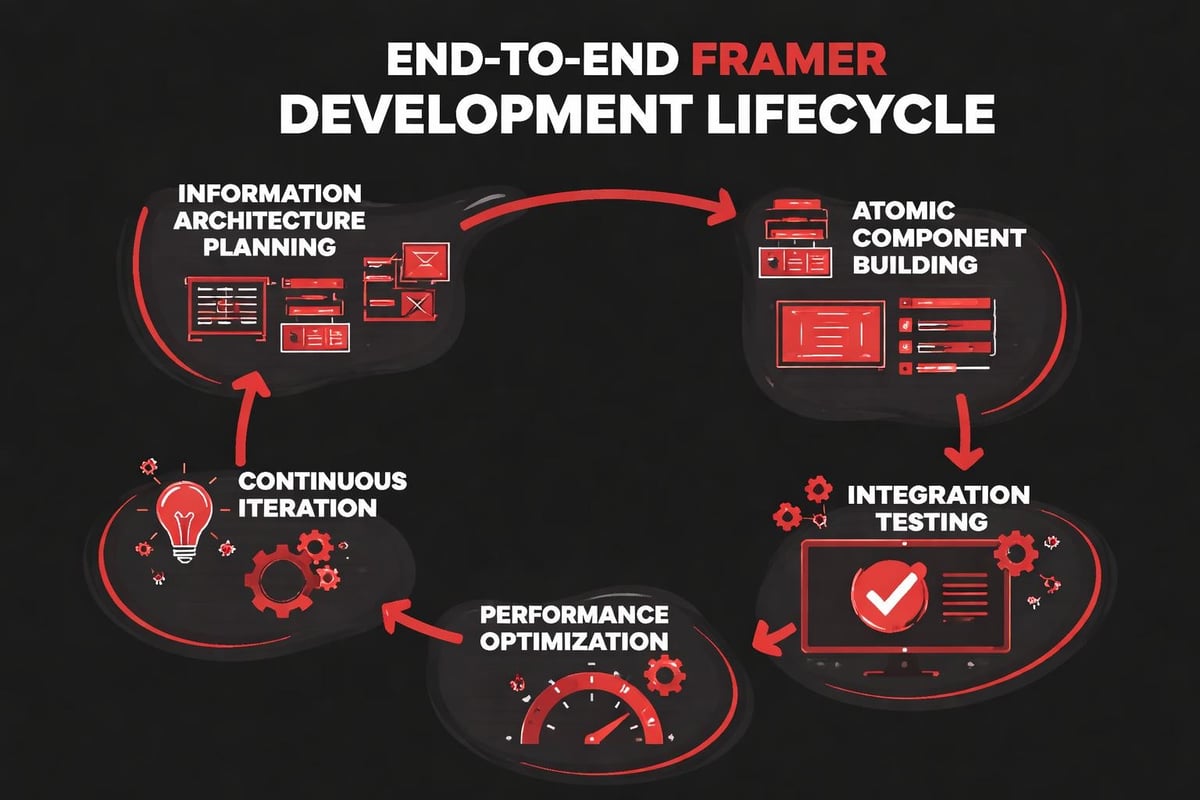
Phase One: Information Architecture
Before touching Framer, map content hierarchy and user flows. What are the core pages? How do visitors navigate between awareness and conversion? What content repeats across sections?
This planning phase identifies component needs early:
- Hero sections with variant layouts for different landing pages
- Feature blocks that work in 2-column, 3-column, and stacked configurations
- Social proof elements (testimonials, logos, metrics) with flexible data sources
- CTA patterns that maintain consistency while adapting to context
Clear architecture prevents the "page explosion" problem where every new landing page requires custom component building instead of composing existing systems.
Phase Two: Component Development
Build your foundation layer first. Start with atomic elements (buttons, form inputs, typography styles) before assembling complex modules. This bottom-up approach feels slower initially but compounds velocity over time.
Each component should answer:
- What variants does this need across the site?
- What data sources will populate dynamic content?
- How does this respond to theme changes or localization?
- What performance constraints apply (image sizes, animation complexity)?
Framer Academy courses cover technical implementation, but strategic thinking determines whether your components create leverage or technical debt.
Phase Three: Performance and Polish
Once structure exists, obsess over speed. Run Lighthouse audits. Check Core Web Vitals. Identify bottlenecks before launch.
Common issues that emerge:
- Large hero videos that could be replaced with optimized animated WebP sequences
- Unused JavaScript from third-party integrations bloating bundle size
- Custom fonts loading without proper fallback strategies
- Overuse of shadows and blur effects triggering excessive repaints
The polishing phase isn't about adding features. It's about removing friction between user intent and site response. Every 100ms improvement in load time correlates with measurable conversion increases.
Collaboration Patterns That Reduce Handoff Friction
Framer development shines when design and development aren't separate disciplines. The platform's collaboration features enable real-time iteration, but tooling only succeeds when team workflows support it.
Establish Clear Component Ownership
In traditional workflows, designers create components in Figma and developers rebuild them in code. Framer collapses this, but role clarity still matters.
Define who owns what:
- Design team controls visual styling, spacing systems, and brand expression
- Development team owns component logic, data integration, and performance optimization
- Product team defines behavioral requirements and conversion priorities
This separation prevents the chaos of simultaneous editing conflicts while maintaining creative flexibility.
Version Control and Testing Protocols
Every framer development project needs systematic testing before deployment. Create staging environments where you validate:
- Cross-browser compatibility (Chrome, Safari, Firefox, Edge)
- Responsive behavior across device sizes and orientations
- Performance metrics under simulated network conditions
- Accessibility compliance using automated scanners and manual keyboard navigation
- CMS integration accuracy when pulling dynamic content
These checks prevent the embarrassment of shipping broken experiences. More importantly, they create confidence to iterate faster because you trust your quality gates.
The Studio Thinking Behind Scalable Framer Development
Everything we've covered connects to a larger principle: systems scale, screens don't. When you build individual pages, you're optimizing for short-term delivery. When you build component systems, you're compounding velocity over time.
This mindset shift transforms how you approach every project decision:
- Instead of asking "How do I build this hero section?" ask "What hero system supports our content strategy for the next 12 months?"
- Instead of manually optimizing each image, build automation that compresses and converts on upload
- Instead of treating performance as a pre-launch checklist, embed it into component creation from day one
The work we showcase demonstrates this approach in practice. Sites that look polished but also load instantly, adapt to changing content needs, and support continuous improvement without requiring rebuilds.
The Continuous Improvement Model
Launch isn't the end of framer development. It's the beginning of data-informed iteration. Post-launch workflows should include:
Monthly performance audits using Core Web Vitals data to identify degradation as content accumulates. A site that launched fast often slows down as teams add pages without considering cumulative impact.
Quarterly component reviews where you evaluate which elements get reused most and which create maintenance burden. Consolidate, deprecate, and refine based on actual usage patterns.
Conversion analysis that connects design decisions to business outcomes. If a specific CTA variant drives higher signup rates, propagate that pattern. If a navigation structure confuses users, simplify it based on session recordings.
This continuous model mirrors how we partner with product teams for ongoing design evolution. Sites aren't static artifacts. They're living systems that improve through iteration.
Advanced Patterns: When Basic Framer Development Isn't Enough
Most projects succeed with Framer's core capabilities. But certain scenarios demand deeper customization, especially when integrating with complex backend systems or implementing sophisticated interactions.
Custom Code Integration
Framer supports custom React components when built-in elements don't satisfy requirements. This opens possibilities like:
- Advanced data visualization using D3.js or similar libraries
- Real-time collaboration features using WebSocket connections
- Custom payment flows that integrate with Stripe or similar services
- Complex form logic with multi-step validation and conditional fields
The key is knowing when to extend versus when to simplify requirements. Custom code adds power but also complexity. Maintenance burden increases. Performance characteristics become harder to predict.
Ask whether the custom solution actually serves user needs or just demonstrates technical capability. Often, simpler approaches with creative use of native Framer features deliver better results with less overhead.
Advanced Animation Orchestration
Sophisticated scroll-driven narratives require coordinating multiple elements with precise timing. Instead of creating individual animations, think in terms of animation systems:
- Define scroll zones that trigger specific animation sequences
- Create easing curves that match your brand's motion language
- Establish timing relationships between elements (this fades in 100ms after that scales up)
- Implement fallbacks for reduced-motion preferences
- Test performance under various device capabilities
This systematic approach creates cohesive experiences rather than disconnected effects competing for attention. The best framer development makes animation feel inevitable, not decorative.
| Feature Category | Basic Implementation | Advanced Pattern |
|---|---|---|
| Data Integration | Static content in components | CMS-connected with real-time updates |
| Forms | Simple contact forms | Multi-step flows with validation and analytics |
| Navigation | Standard menu bar | Context-aware with usage prediction |
| Search | Basic text matching | Semantic search with AI-powered suggestions |
| Analytics | Standard page tracking | Event-driven with conversion attribution |
The Misconceptions That Hold Teams Back
Several persistent myths prevent teams from fully leveraging framer development capabilities. Addressing them directly saves months of misguided effort.
"Framer is just for designers, not developers." This undersells both the platform and the role of modern developers. Today's developers blend visual thinking with technical execution. Framer rewards this hybrid skillset.
"You can't build complex applications in Framer." While Framer focuses on marketing sites and product experiences rather than full application backends, the definition of "complex" is expanding. Many SaaS companies run their entire customer-facing presence on Framer, integrating with backend services through APIs.
"Performance will always be worse than hand-coded sites." Poorly built Framer sites are slow. Poorly hand-coded sites are also slow. The platform provides excellent optimization tools. Using them effectively determines outcomes.
"AI will eventually replace framer development skills." AI assists. It doesn't replace judgment about information hierarchy, brand expression, or conversion psychology. The developers who combine AI efficiency with strategic thinking are the ones building exceptional experiences.
These misconceptions often stem from comparing Framer to the wrong alternatives or evaluating it based on outdated capabilities. The platform evolved significantly. So should your mental model of what's possible.
Building Toward Production-Ready Systems
The transition from prototype to production separates amateur framer development from professional execution. Production readiness requires addressing concerns that prototypes often ignore.
Error States and Edge Cases
Designing the happy path is easy. Handling reality requires planning for:
- Form submissions that fail due to network issues
- Images that don't load because of broken CDN links
- Dynamic content that returns empty data sets
- User permissions that restrict certain features
- Browser capabilities that don't support specific features
Each component should gracefully degrade when things go wrong. Show meaningful error messages. Provide retry mechanisms. Don't let technical failures destroy user trust.
Documentation and Maintenance
Six months after launch, will your team remember why specific components have certain constraints? Documentation isn't overhead. It's infrastructure that enables future velocity.
Document:
- Component intended use cases and variant purposes
- Performance budgets and optimization strategies
- Data source mappings and API dependencies
- Browser support matrices and known limitations
- Accessibility requirements and testing procedures
The systematic approach we bring to client projects emphasizes documentation as core deliverable, not afterthought. It transforms knowledge from individual expertise into team capability.
Security and Compliance Considerations
Even marketing sites handle user data. Contact forms collect emails. Analytics track behavior. Cookie banners manage consent. Framer development must address:
- GDPR compliance for European visitors
- CCPA requirements for California users
- Accessibility standards (WCAG 2.1 Level AA minimum)
- Security headers and SSL configuration
- Third-party script auditing to prevent data leaks
These aren't optional extras for "enterprise" clients. They're baseline expectations in 2026. Ignoring them creates legal risk and erodes user trust.
The Future of Framer Development: Trends Worth Watching
The platform continues evolving rapidly. Staying current means understanding where development patterns are heading, not just where they've been.
AI-assisted component generation will become more sophisticated. Instead of manually building variants, you'll describe desired behavior and AI will generate initial structures. Human refinement will focus on strategic decisions rather than repetitive configuration.
Performance automation will improve. Expect more intelligent asset optimization that happens automatically based on usage context rather than requiring manual intervention.
Cross-platform experiences will blur boundaries between web and native. Framer sites already work seamlessly on mobile, but future developments will likely enable progressive web app capabilities that compete with native applications.
Collaborative workflows will deepen integration with other tools. Real-time design-to-development handoffs will become smoother as platforms communicate more effectively.
The common thread: framer development becomes less about technical implementation and more about strategic thinking. Tools handle repetition. Humans focus on problems that require judgment, creativity, and understanding of user psychology.
Framer development succeeds when you treat it as a discipline that bridges design aesthetics and engineering rigor, not as a tool that replaces either. The teams shipping exceptional experiences in 2026 understand this convergence and build systems that compound velocity over time. If you're looking to build conversion-focused web experiences that scale alongside your product, Embark Studio™ partners with startups to design and continuously evolve high-performance sites using modern workflows that reduce handoffs and accelerate growth.
Get articles like this in your inbox
Practical design and growth insights for founders. No spam, unsubscribe anytime.


